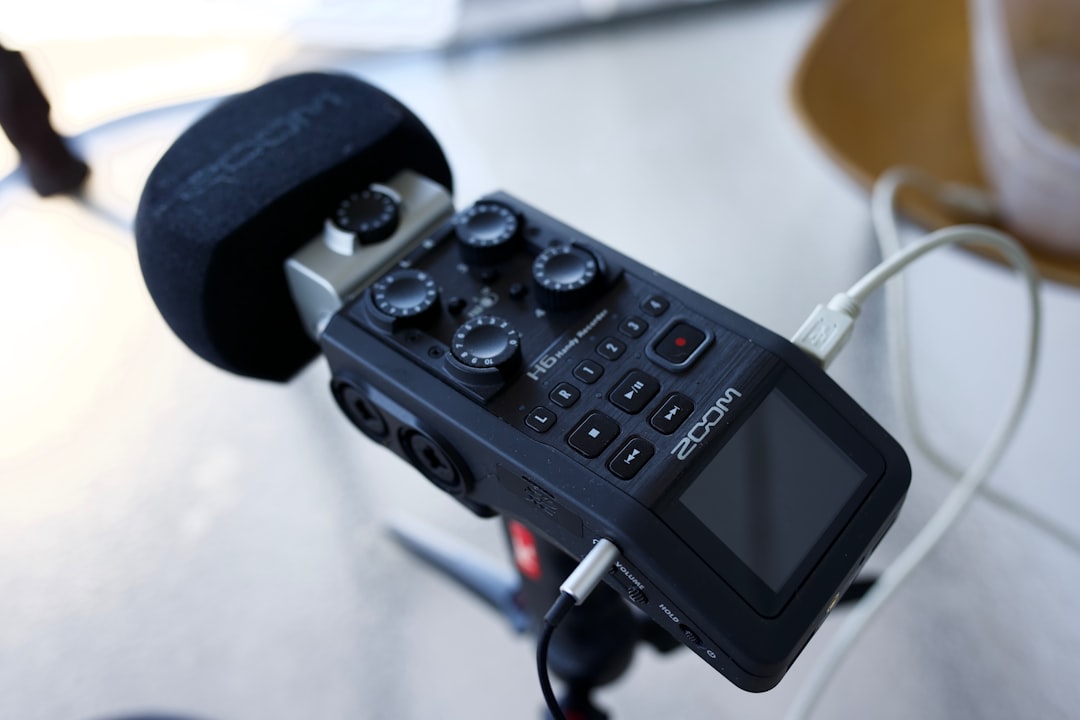
The Zoom H6 is a little gray box with a big job. It records voices, music, interviews, sound effects, and random creative chaos. For podcasters and creators, it can be a studio, a field recorder, and a backup plan all at once. It is not perfect. But it is very useful.
TLDR: The Zoom H6 is a strong choice for podcasters, YouTubers, interviewers, and creators who need flexible audio recording. It has four XLR inputs, interchangeable mic capsules, and simple controls that are easy to learn. It sounds good, travels well, and works without a computer. The main downsides are its older menu style, average battery life with phantom power, and lack of modern extras like 32 bit float recording.
What Is the Zoom H6?
The Zoom H6 is a portable audio recorder. That means it can record sound on its own. No laptop is required. No giant mixer is needed. Just add an SD card, batteries, and a microphone.
It can record up to six tracks at the same time. That is where the “H6” name comes from. You get four built in combo inputs. These accept XLR and quarter inch cables. You also get two more channels from the mic capsule on top.
That sounds technical. Here is the simple version. You can record a full podcast crew with it. Host, co host, two guests, and a stereo room mic. Boom. Tiny studio in a backpack.
Who Is It For?
The Zoom H6 is made for people who care about audio but do not want a huge setup. It is great for creators who move around. It is also great for people who want backup recordings.
It works well for:
- Podcasters with one to four microphones.
- YouTubers who want better sound.
- Interviewers recording in person.
- Filmmakers capturing dialogue or ambient sound.
- Musicians recording demos or live sessions.
- Teachers, speakers, and event creators.
If your show happens around a table, the H6 can handle it. If your content happens in a park, car, hallway, kitchen, or hotel room, it can handle that too. It likes adventure. It is the audio equivalent of wearing cargo pants.
Design and Build
The H6 is chunky, but not huge. It feels like a serious gadget. The body is mostly plastic, but it does not feel like a toy. The buttons are clear. The gain knobs are right on the front. That is a big win.
Each input has its own gain knob. This matters a lot. If one guest is loud and another guest whispers like a sleepy mouse, you can adjust them separately. You do not need to dig through menus while everyone stares at you.
The screen is color and easy enough to read. It is not fancy. It will not win a beauty contest. But it shows what you need. Levels, tracks, battery, and recording time are all visible.
The H6 also has physical record buttons for each track. This makes it easy to arm only the mics you want. Press the button. See the light. Feel like a professional. Nice.
Inputs and Recording Options
This is where the Zoom H6 shines. It has four combo inputs. You can plug in dynamic microphones, condenser microphones, instruments, or line level gear. It also offers phantom power for condenser mics.
Phantom power is just power sent through an XLR cable. Some mics need it. Some do not. If your mic needs 48V, the H6 can provide it.
The top of the recorder uses interchangeable capsules. The standard capsule is usually a stereo X/Y mic. It is great for quick recording. You can capture room sound, music, crowd noise, or a two person chat in a pinch.
Some bundles include different capsules. You can also buy others separately. This makes the H6 flexible. It is like putting different hats on the same little robot.
Sound Quality
The sound quality is good. For podcasts, it is more than good enough. Voices sound clean when you use decent microphones and set levels correctly. The H6 records in WAV or MP3. For serious work, use WAV.
The preamps are not the quietest in the world. Expensive studio interfaces can sound cleaner. Newer recorders may also have better noise performance. But for podcasts, interviews, and creator work, the H6 still holds up well.
The key is gain. Do not crank the gain too high. Put the mic close to the speaker. Use headphones. Watch the meters. If your levels are healthy, the H6 does a solid job.
It can record at up to 24 bit and 96 kHz. For most podcasts, 24 bit and 48 kHz is a smart choice. It gives you good quality without giant files. Your editor will be happy. Your SD card will also be happy.
Using It for Podcasting
As a podcast recorder, the H6 is very practical. You plug in your microphones. You set gain. You press record. That is the basic flow. It is not scary.
For a two person podcast, it is almost too easy. Use two XLR mics. Give each person their own track. If one person coughs, laughs too loudly, or bumps the table, you can fix that track later.
For a four person show, the H6 is still comfortable. Each mic gets its own input. Each voice gets its own track. Editing becomes much easier than recording everyone into one mixed file.
Best podcast setup:
- Use dynamic microphones if the room is noisy.
- Record each speaker on a separate track.
- Use headphones while recording.
- Keep mouths close to microphones.
- Record a short test before the real episode.
That last tip is important. Always do a test. Ten seconds can save one hour of pain. Audio gremlins are real. They wear tiny headphones.
Using It for Video and YouTube
The H6 is also helpful for video creators. Camera audio is often weak. The H6 gives you better control. You can record audio separately and sync it later. Clap once at the start. Match the clap in editing. Easy.
You can also send audio from the H6 into your camera. This gives the camera a cleaner reference track. Some creators use both. They record a high quality track on the H6 and a backup track on the camera.
This is smart. Backups are boring until you need one. Then they become beautiful.
For talking head videos, the H6 can sit on a desk. For interviews, it can live between two people. For filmmaking, it can go in a sound bag. It is not tiny, but it is portable enough.
Battery Life
The Zoom H6 runs on four AA batteries. That is convenient. You can buy AA batteries almost anywhere. Gas station? Yes. Airport? Probably. Drawer full of mystery batteries? Also yes.
Battery life depends on how you use it. If you record with the built in mics, it lasts longer. If you use four condenser mics with phantom power, it drains faster. Much faster.
For serious sessions, bring extra batteries. Better yet, use USB power. A power bank can keep the H6 going for long sessions. This is great for events, long interviews, or podcast marathons.
Menus and Ease of Use
The H6 is simple on the surface. The main controls are easy. The menu system is less fun. It feels older. It works, but it is not slick.
You may need to click around to format your SD card, choose file type, set phantom power, or change recording settings. Once you learn the menu, it is fine. But the first day may feel like using a tiny spaceship from 2013.
The good news is that you do not need the menu all the time. Most recording tasks happen with the physical buttons and knobs. That is why many creators still love it.
Portability
The H6 fits in a bag easily. It is not pocket friendly unless you have very ambitious pockets. But it is travel friendly. It is great for creators who record outside the studio.
The included case, if your bundle has one, helps keep capsules and cables safe. You should still be gentle with it. The top capsule connection is useful, but it is not something you want to smash.
What I Like
- Flexible inputs: Four XLR combo jacks make it very useful.
- Separate tracks: Editing podcasts becomes much easier.
- Standalone recording: No computer required.
- Interchangeable capsules: You can adapt it to different jobs.
- Physical controls: Gain knobs and track buttons are fast.
- Good sound: It is clean enough for most creator work.
What I Do Not Like
- The menus feel old: They work, but they are not elegant.
- No 32 bit float: You still need to set levels carefully.
- Battery drain: Phantom power can eat batteries quickly.
- Preamps are decent, not amazing: Very quiet mics may need extra gain.
- No built in podcast pads: It is not a soundboard.
Zoom H6 vs Audio Interface
An audio interface needs a computer. The H6 does not. That is the big difference. If you always record at a desk, an interface may be better. It can be cheaper, cleaner, and easier for live computer work.
But the H6 wins when you need freedom. You can record at a coffee shop, a conference, or a friend’s house. You can also use it as a USB audio interface when needed. So it can do both jobs, though not always as smoothly as a dedicated interface.
Is It Good for Beginners?
Yes. With one warning. Beginners must learn gain. That is true with any recorder. If your levels are too low, you get noise. If your levels are too high, you get distortion. Distortion is not cute. It cannot be fixed easily.
Start simple. Use one mic. Record a test. Listen back. Then add more mics. The H6 grows with you. That is one of its best features.
Final Verdict
The Zoom H6 is a classic for a reason. It is flexible, reliable, and friendly enough for everyday creators. It can record a solo podcast today and a four person interview tomorrow. It can sit on a desk or travel in a backpack.
It is not the newest recorder on the planet. Its menus feel dated. It does not have modern safety nets like 32 bit float. But it still gets the job done, and it does it well.
If you are a podcaster or creator who wants a portable recorder with real inputs and solid sound, the Zoom H6 is still worth considering. Treat it well. Set your levels. Bring spare batteries. Then press record and make something great.