
Digital marketing in 2026 feels like running a tiny spaceship. There are emails to write. Posts to schedule. Ads to test. Videos to edit. Reports to explain. Good news: free AI tools can help you do more without turning into a stressed potato.
TLDR: The best free AI tools for digital marketing in 2026 help with writing, design, video, research, SEO, social media, and analytics. Start with tools like ChatGPT, Gemini, Canva, CapCut, Perplexity, and Google Trends. Use them to move faster, test ideas, and make better content. Just remember: AI is your helper, not your boss.
Why free AI tools matter in 2026
Marketing is faster than ever. People scroll fast. Trends change fast. Platforms change their rules all the time. Your coffee gets cold before your campaign is done.
This is where AI helps. It can write drafts. It can suggest ideas. It can turn long videos into short clips. It can find trends. It can explain data in plain English.
And the best part? Many great tools have free plans. They may have limits. But they are still powerful enough for freelancers, creators, startups, and small teams.
Think of them as your free marketing interns. Very fast. Sometimes weird. Always in need of a human check.

1. ChatGPT for content ideas and copy
ChatGPT is still one of the most useful free AI tools for marketers. You can use it for blog ideas, ad copy, email drafts, product descriptions, video scripts, and customer replies.
It is great when you are staring at a blank page. That blank page is evil. ChatGPT helps you punch it in the face.
Best uses:
- Write social media captions.
- Create blog outlines.
- Rewrite boring text.
- Brainstorm campaign ideas.
- Make email subject lines.
Simple tip: Give it context. Do not just say, “Write a post.” Say who the post is for, what product you sell, what tone you want, and what action you want readers to take.
2. Google Gemini for web connected ideas
Gemini is useful for research, content planning, and quick summaries. It works well with Google’s ecosystem. That makes it handy if your marketing life already lives inside Gmail, Docs, Sheets, and Drive.
You can ask it to explain trends, compare products, draft campaign angles, or turn rough notes into clean content.
Best uses:
- Summarize research.
- Draft Google Docs content.
- Create campaign plans.
- Explain complex topics simply.
Use it when you want a smart second brain that does not ask for snacks.
3. Perplexity for research that does not feel painful
Perplexity is a strong free AI research tool. It gives answers with sources. That is helpful when you need facts, stats, or market information.
Marketers can use it to study competitors, learn about audiences, explore industry changes, and collect content ideas. It is faster than opening twenty tabs and crying softly.
Best uses:
- Find market trends.
- Research competitors.
- Collect source links.
- Study audience questions.
Simple tip: Always check the sources. AI can still make mistakes. It can sound confident while being very wrong. Like a toddler in sunglasses.
4. Canva for quick AI design
Canva is a favorite for social media graphics, presentations, thumbnails, flyers, and simple brand assets. Its free plan gives you many templates and useful AI design features.
You can create Instagram posts, YouTube thumbnails, LinkedIn banners, lead magnets, and ad visuals. You do not need to be a designer. You just need taste, patience, and maybe fewer neon fonts.
Best uses:
- Create social graphics.
- Make ad creatives.
- Design presentation slides.
- Resize content for different platforms.
Simple tip: Make three versions of every design. Then pick the cleanest one. Clean usually wins.
5. CapCut for short videos
CapCut is a powerful free video editor with AI features. It is great for TikTok, Reels, Shorts, and quick product videos.
Short video still rules in 2026. People love fast tips, behind the scenes clips, demos, reactions, and stories. CapCut helps you cut, caption, edit, and polish videos quickly.
Best uses:
- Add auto captions.
- Remove silence.
- Create social video clips.
- Use templates for fast edits.
- Make product demo videos.
Captions are not optional anymore. Lots of people watch videos with no sound. Your brilliant video should not become silent confusion.
6. Buffer AI Assistant for social posts
Buffer offers helpful social media tools, including AI support on its free plan. It can help create posts, rewrite captions, and adjust tone.
This is great when one idea needs to become five posts. A LinkedIn post should not sound like a TikTok caption. A tweet should not read like a legal contract.
Best uses:
- Write platform specific captions.
- Repurpose content.
- Plan basic social schedules.
- Test different tones.
Simple tip: Do not post AI captions without editing. Add your brand voice. Add real examples. Add a little human flavor.
7. HubSpot free AI tools for emails and CRM
HubSpot has free CRM tools and AI features that can help with marketing emails, customer notes, and sales content. It is useful if you want to track leads and write better messages.
You can use it to draft emails, organize contacts, and keep follow ups from disappearing into the void.
Best uses:
- Write email drafts.
- Manage leads.
- Track customer interactions.
- Create simple sales content.
If your inbox is a jungle, this can be your machete.
8. Google Trends for trend spotting
Google Trends is free and still very useful. It shows what people are searching for. It helps you understand rising topics, seasonal demand, and regional interest.
It is not flashy. It does not wear a robot hat. But it is gold for content planning.
Best uses:
- Find trending topics.
- Compare keyword interest.
- Plan seasonal campaigns.
- Spot regional demand.
Simple tip: Compare two or three topic ideas before writing. Pick the one with rising interest. Do not guess when free data exists.
9. Google Analytics insights for smarter reports
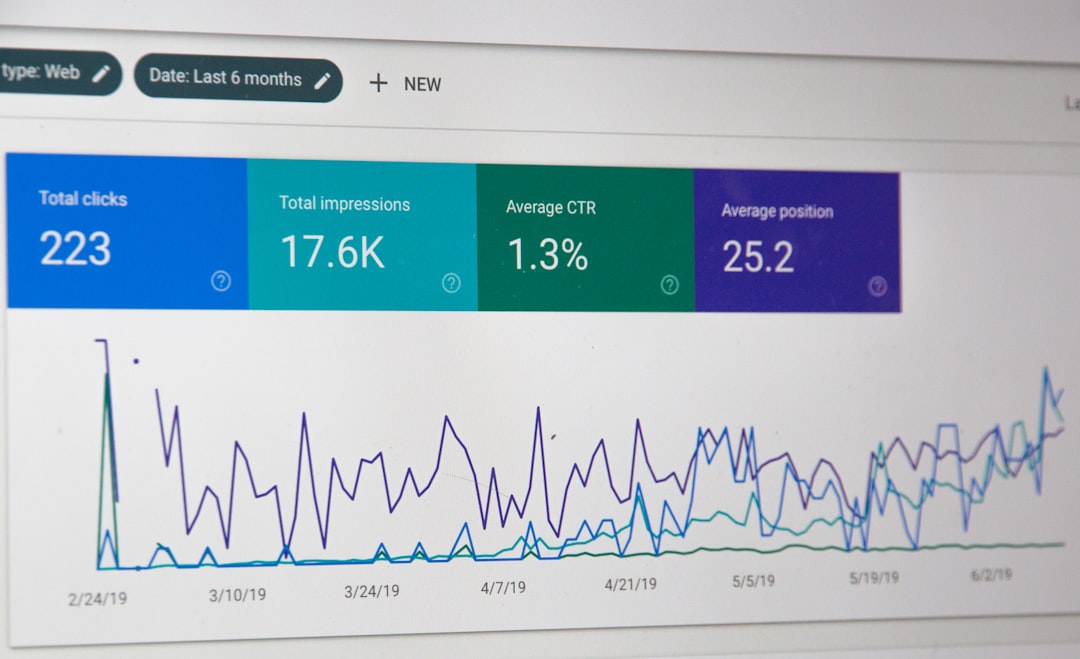
Google Analytics can help you understand website traffic, conversions, and user behavior. Its insights features make it easier to spot changes without digging through every chart.
This helps you answer important questions. Where did traffic come from? Which pages worked? Which campaign made people click? Why did everyone leave that one landing page like it had spiders?
Best uses:
- Track campaign results.
- Find top pages.
- Understand traffic sources.
- Spot conversion problems.
10. NotebookLM for turning notes into content
NotebookLM is a helpful AI research and note tool from Google. You can upload or add sources, then ask questions based on that material.
For marketers, this is great for turning webinars, reports, interviews, and messy notes into clear content ideas.
Best uses:
- Summarize long documents.
- Find key points in research.
- Create content briefs.
- Prepare podcast or video outlines.
Simple tip: Use it to build a content hub. Add your customer research, old blog posts, sales notes, and FAQs. Then ask it for new content ideas.
How to choose the right free AI tools
Do not collect tools like digital Pokémon. That gets messy fast. Pick tools based on your biggest marketing pain.
- Need content? Try ChatGPT or Gemini.
- Need research? Try Perplexity or Google Trends.
- Need visuals? Try Canva.
- Need video? Try CapCut.
- Need social posts? Try Buffer.
- Need reports? Try Google Analytics.
Start with two or three tools. Learn them well. Build simple workflows. Then add more only when needed.
Final thoughts
Free AI tools can save time, spark ideas, and make digital marketing less scary. They help small teams look bigger. They help solo marketers move faster. They help beginners stop feeling lost.
But the magic is not the tool. The magic is how you use it. Good prompts matter. Good strategy matters. Good editing matters.
Let AI do the heavy lifting. You bring the taste, the truth, and the human spark. That is still the best marketing tool in 2026.